# Build a Basic Marker Tracking Experience

{% content-ref url="<https://app.gitbook.com/o/QMsd5hT6sxA9FBIB03yh/s/3UKy7VHRJWrNarYaMp13/>" %}
[Blippar Documentation Centre](https://app.gitbook.com/o/QMsd5hT6sxA9FBIB03yh/s/3UKy7VHRJWrNarYaMp13/)
{% endcontent-ref %}

## **Marker Tracking** <a href="#h_01fvh21d5yfx9y9rn96j2vc501" id="h_01fvh21d5yfx9y9rn96j2vc501"></a>

## Create a basic scene <a href="#h_01fvhfz0v8b3c7ydepb6vsrf7v" id="h_01fvhfz0v8b3c7ydepb6vsrf7v"></a>

* Create a basic scene from [playground.babylonjs.com](https://playground.babylonjs.com/) and download the source code by clicking the Download button.
* Or you can download the already generated basic scene code from [this link](https://webar-sdk.blippar.com/static/babylonjs_basic_scene.zip).

<figure><img src="https://2886719054-files.gitbook.io/~/files/v0/b/gitbook-x-prod.appspot.com/o/spaces%2FqVKCSCzJmvbknXbHtARJ%2Fuploads%2Fgit-blob-02da1686e5037ca2253710308c3597faa14b365c%2Fplayground_babylonjs%20(1).png?alt=media" alt=""><figcaption><p>Download Basic Scene Code</p></figcaption></figure>

* Unzip the downloaded code and open the index.html file a code editor of your choice.
* This basic scene source code from Babylon.js playground has the code to create the babylon rendering engine and construct a scene with a Sphere and a ground plane model.
* It also has many javascript libraries which are not necessary for this example. Hence **delete all the script tags** and include only the following Babylon.js scripts.

  ```html
  <!-- Babylon.js -->
  <!-- Delete all the other scripts and add only the following scripts -->
  <script src="https://cdn.babylonjs.com/babylon.js"></script>
  <script src="https://cdn.babylonjs.com/loaders/babylonjs.loaders.min.js"></script>
  ```

{% hint style="danger" %}

```
This document is compatible with Babylon.js version 4.2.0.
```

{% endhint %}

````
Delete these redundant lines from the playground generated code which are not necessary for webar experience.

```javascript
// This targets the camera to scene origin
camera.setTarget(BABYLON.Vector3.Zero());

// This attaches the camera to the canvas
camera.attachControl(canvas, true);
```
````

## Add WebAR SDK script <a href="#h_01fvhfza8je15mqgrkjxkdy0ev" id="h_01fvhfza8je15mqgrkjxkdy0ev"></a>

Add the webar sdk script tag with the following attributes

* webar-mode="**marker-tracking**"
* auto-start="true"
* rendering-engine="**babylonjs**"

{% hint style="info" %}
Set the webar-mode attribute to "marker-tracking" to make the webar sdk run in marker tracking mode.
{% endhint %}

As a query parameter in the https url of webar sdk script, paste your license key obtained from Blippar hub which will be in the following form:

```javascript
?license-key=xxxxxxxx-1111-2222-3333-yyyyyyyyyyyy
```

{% hint style="danger" %}
Make sure this webar sdk script is added only after the babylonjs script has been added in the previous section.
{% endhint %}

{% hint style="info" %}
There are other attributes to customise the way the loading progress bar screen appears. Please refer [API Customization ](https://docs.blippar.com/webar-sdk/v.1.7.0/api/api-customization)documentation for more details.
{% endhint %}

```html
<script src="https://webar-sdk.blippar.com/releases/1.4.3/webar-sdk-v1.5.3.min.js?license-key=xxxxxxxx-1111-2222-3333-yyyyyyyyyyyy"
  webar-mode="marker-tracking"
  auto-init="true"
  auto-start="true"
  rendering-engine="babylonjs">
</script>
```

## Create webar marker mesh map array <a href="#h_01fvhftjcztwca4wrmm0bp262a" id="h_01fvhftjcztwca4wrmm0bp262a"></a>

A webar marker is an empty Babylon mesh object in the scene. Set this webar marker mesh object as the parent of the 3D objects that has to be displayed when scanning a physical marker image.

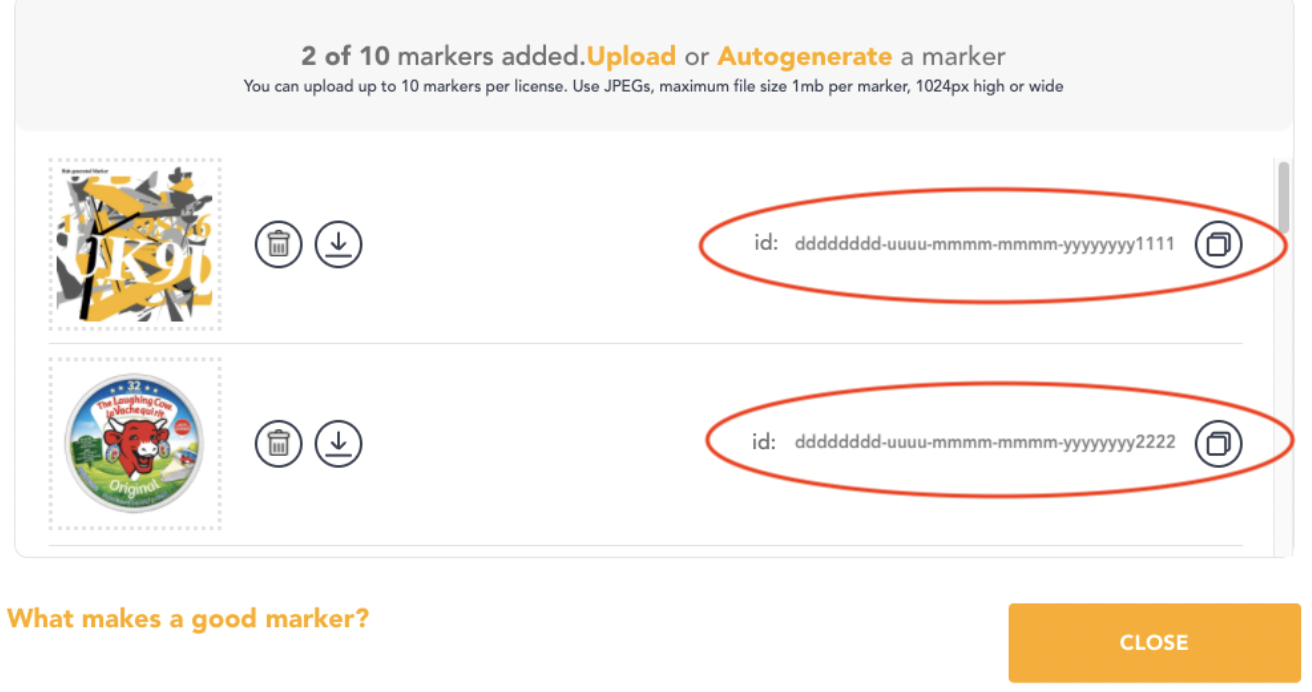
In the Blippar Hub you can upload up to 10 marker images. For each marker image a webar marker mesh has to be created and mapped with the marker image id obtained from Blippar hub (marked with red circle in the below picture). Please have a look at this article to know how to Add and Manage markers in Blippar hub and obtain a marker id.

<figure><img src="https://2886719054-files.gitbook.io/~/files/v0/b/gitbook-x-prod.appspot.com/o/spaces%2FqVKCSCzJmvbknXbHtARJ%2Fuploads%2Fgit-blob-86c892d29770d3cb1ce4cd935cb4ba357ebae58a%2FScreenshot%202022-12-07%20at%201.14.16%20PM.png?alt=media" alt=""><figcaption><p>Licence Key</p></figcaption></figure>

A webar marker mesh (e.g. markerMeshObject\_1) is mapped with a marker image id (e.g. dddddddd-uuuu-mmmm-mmmm-yyyyyyyy1111) using the following javascript object structure:

```javascript
{
  markerId   : "dddddddd-uuuu-mmmm-mmmm-yyyyyyyy1111",
  markerMesh : <markerMeshObject_1>
}
```

An array of such objects can be constructed to map multiple marker image ids with their corresponding marker mesh object. This array will be passed as an argument to WebAR SDK's InitBabylonJs API which will be used by the sdk to decide which object has to be displayed on which marker image when it is detected.

```javascript
[
  {
    markerId   : "dddddddd-uuuu-mmmm-mmmm-yyyyyyyy1111",
    markerMesh : <markerMeshObject_1>
  },
  {
    markerId : "dddddddd-uuuu-mmmm-mmmm-yyyyyyyy2222",
    markerMesh : <markerMeshObject_2>
  }
]
```

In this example we use two marker images. Hence two webar marker mesh objects have to be created.

Under the createScene function:

* First delete these lines of playground generated code which creates sphere and ground meshes.

```javascript
// Our built-in 'sphere' shape.
var sphere = BABYLON.MeshBuilder.CreateSphere("sphere", {diameter: 2, segments: 32}, scene);

// Move the sphere upward 1/2 its height
sphere.position.y = 1;

// Our built-in 'ground' shape.
var ground = BABYLON.MeshBuilder.CreateGround("ground", {width: 6, height: 6}, scene);
```

* Construct two webar mark mesh objects

```javascript
// Create two empty meshes. Models/meshes appended as a children to this empty mesh will be displayed on the corresponding mapped marker.
 let webarMarkerMesh1 = new BABYLON.Mesh("webarMarkerMesh1", scene);
 let webarMarkerMesh2 = new BABYLON.Mesh("webarMarkerMesh2", scene);
```

* Define an array **webarMarkerMeshMap** and push the map object containing the markerId and markerMesh values

<pre class="language-javascript"><code class="lang-javascript"><strong>var webarMarkerMeshMap = [];
</strong>
webarMarkerMeshMap.push({ markerId: "dddddddd-uuuu-mmmm-mmmm-yyyyyyyy1111", markerMesh: webarMarkerMesh1 });
webarMarkerMeshMap.push({ markerId: "dddddddd-uuuu-mmmm-mmmm-yyyyyyyy2222", markerMesh: webarMarkerMesh2 });
</code></pre>

## Add a GLB model to the first marker mesh <a href="#h_01fvhfv0vmqg1frt39qmt6ymgt" id="h_01fvhfv0vmqg1frt39qmt6ymgt"></a>

Under the createScene function, import the GLB file MaterialsVariantsShoe.glb using Babylon SceneLoader and set **webarMarkerMesh1** as the parent for the mesh nodes.

{% hint style="info" %}
When Babylon imports GLB model files, it creates a \_\_root\_\_ mesh as a parent node for all the meshes. So skip the \_\_root\_\_ mesh in setting the webarMarkerMesh1 as its parent.
{% endhint %}

```javascript
BABYLON.SceneLoader.ImportMesh(null, "./models/", "MaterialsVariantsShoe.glb", scene, function (meshes, particleSystems, skeletons) {
  let xQuat = new BABYLON.Quaternion();
  for (mesh of meshes) {
    if (mesh.name !== '__root__') {
      // Move the loaded models to webarMarkerMesh1
      mesh.setParent(webarMarkerMesh1);
      BABYLON.Quaternion.FromEulerAnglesToRef(Math.PI / 2, 0, 0, xQuat);
      mesh.rotationQuaternion.multiplyInPlace(xQuat);
      scaleByFactor(mesh, 6);
    }
  }
});
```

## Add a GLB model to the first marker mesh <a href="#h_01fvhfv0vmqg1frt39qmt6ymgt" id="h_01fvhfv0vmqg1frt39qmt6ymgt"></a>

Under the createScene function, import the GLB file MaterialsVariantsShoe.glb using Babylon SceneLoader and set **webarMarkerMesh1** as the parent for the mesh nodes.

{% hint style="info" %}
When Babylon imports GLB model files, it creates a \_\_root\_\_ mesh as a parent node for all the meshes. So skip the \_\_root\_\_ mesh in setting the webarMarkerMesh1 as its parent.
{% endhint %}

```javascript
BABYLON.SceneLoader.ImportMesh(null, "./models/", "MaterialsVariantsShoe.glb", scene, function (meshes, particleSystems, skeletons) {
  let xQuat = new BABYLON.Quaternion();
  for (mesh of meshes) {
    if (mesh.name !== '__root__') {
      // Move the loaded models to webarMarkerMesh1
      mesh.setParent(webarMarkerMesh1);
      BABYLON.Quaternion.FromEulerAnglesToRef(Math.PI / 2, 0, 0, xQuat);
      mesh.rotationQuaternion.multiplyInPlace(xQuat);
      scaleByFactor(mesh, 6);
    }
  }
});
```

## Add a GLB model to the second marker mesh <a href="#h_01fvhfvcsv2krpthra3fgpgdf6" id="h_01fvhfvcsv2krpthra3fgpgdf6"></a>

Similarly, import the GLB file milk\_bottle\_1l.glb using Babylon SceneLoader and set **webarMarkerMesh2** as the parent for the mesh nodes.

{% hint style="info" %}

* In SceneLoader ImportMesh API filter 'Object\_4' and 'Object\_6' nodes alone to exclude the unwanted parts of the milk\_bottle\_1l.glb model from loading.
* When Babylon imports GLB model files, it creates a \_\_root\_\_ mesh as a parent node for all the meshes. So skip the \_\_root\_\_ mesh in setting the webarMarkerMesh2 as its parent.
  {% endhint %}

```javascript
BABYLON.SceneLoader.ImportMesh(['Object_4', 'Object_6'], "./models/", "milk_bottle_1l.glb", scene, function (meshes, particleSystems, skeletons) {
  for (mesh of meshes) {
    if (mesh.name !== '__root__') {
      // Move the loaded models to webarMarkerMesh2
      mesh.setParent(webarMarkerMesh2);
      mesh.position.y = -0.75;
      scaleByFactor(mesh, 5);
    }
  }
});
```

## Initialise WebAR SDK <a href="#h_01fvhfyk633h8pesg3v6xf7w46" id="h_01fvhfyk633h8pesg3v6xf7w46"></a>

Under the createScene function, call the Webar SDK's InitBabylonJs API. Once the webar sdk script is loaded, its APIs can be accessed using the WEBARSDK global variable. Please refer to the [API Reference](https://github.com/blippar/gitbook/blob/main/v1.7.0/api/api-ref-1.5.3)[ ](https://github.com/blippar/gitbook/blob/main/v1.7.0/api/api-ref-1.5.3)documentation for more details.

```javascript
// Pass babylon canvas, scene, camera and webarStage mesh to WebarSdk to initialize surface tracking
WEBARSDK.InitBabylonJs(canvas, scene, camera, webarMarkerMeshMap);
```

## Deployment <a href="#h_01fvhfy9rs7nm52pppf4vpgwb4" id="h_01fvhfy9rs7nm52pppf4vpgwb4"></a>

Deploy your files (the HTML file and the **blippar** folder if you downloaded the SDK) to your web server.

Note:

* You can also develop and host locally in Dev Mode, see more info here[ Develop Locally.](https://docs.blippar.com/webar-sdk/v.1.7.0/publish-your-creation/develop-locally)
* Your website **must have https** **enabled,** this is to enable the browser to access your camera.

Navigate to your page, the WebAR SDK should work with any modern browser but is extensively tested with Safari (iOS) and Chrome (android). If all has gone well you will see the following results below. Information about launching the AR experience is available[ ](https://patrickttest.gitbook.io/webar-sdk/-MkrnSkYFVhXKBdyZ3pk/introduction/launching-a-webar-experience)[here](https://docs.blippar.com/webar-sdk/v.1.7.0/publish-your-creation/launch-the-experience).

## Full Source Code <a href="#h_01fvhfwq350ygdkzg5wh04q4wt" id="h_01fvhfwq350ygdkzg5wh04q4wt"></a>

Full source code of this WebAR SDK BabylonJS Marker Tracking example can be seen in the [Github repository.](https://github.com/blippar/webar-sdk-example/blob/main/babylon/marker-tracking/index.html)

## Resulting Marker Tracking Experience <a href="#h_01fvhfvtn0kvzej9rhdnvhdpmb" id="h_01fvhfvtn0kvzej9rhdnvhdpmb"></a>

<figure><img src="https://2886719054-files.gitbook.io/~/files/v0/b/gitbook-x-prod.appspot.com/o/spaces%2FqVKCSCzJmvbknXbHtARJ%2Fuploads%2Fgit-blob-9383543c0c9a63327c5a4e85e9bd60b766179118%2Fbabylon_marker_tracking_demo.gif?alt=media" alt=""><figcaption><p>Marker Tracking Experience</p></figcaption></figure>